

One QR Code
All Your Event Photos
Guests scan, tap, and upload—no login, no apps. You get a beautiful gallery, a live photo wall, and a one-click download.
Everything you need to collect event photos
Simple, powerful features designed to make photo collection effortless for you and your guests.
Create Your Event QR Code
Set up your event in minutes. Get a unique QR code that you can print on cards, display on screens, or share via WhatsApp. No technical skills needed—just enter your event details and you're ready.
No App Download Required
Your guests don't need to install anything. They simply open their phone's camera, point it at your QR code, and tap the link that appears. Works on any smartphone—iPhone or Android.
Upload Multiple Photos at Once
Guests can select and upload many photos in a single tap. No need to upload one by one. They choose all their favorite photos from their gallery and send them together—fast and easy.
See Photos Appear in Real-Time
Watch as photos come in during your event. Every photo your guests upload appears instantly in your gallery. You can view them on your phone, tablet, or share the gallery link with family and friends who couldn't attend.
Full Control Over Your Photos
You decide what gets shown. Hide photos you don't like, approve uploads before they appear, or keep your gallery private. Download everything as a ZIP file whenever you want. Your photos, your rules.
See how easy it is for your guests
No apps, no accounts, no hassle. Just scan, tap, and upload—it's that simple!
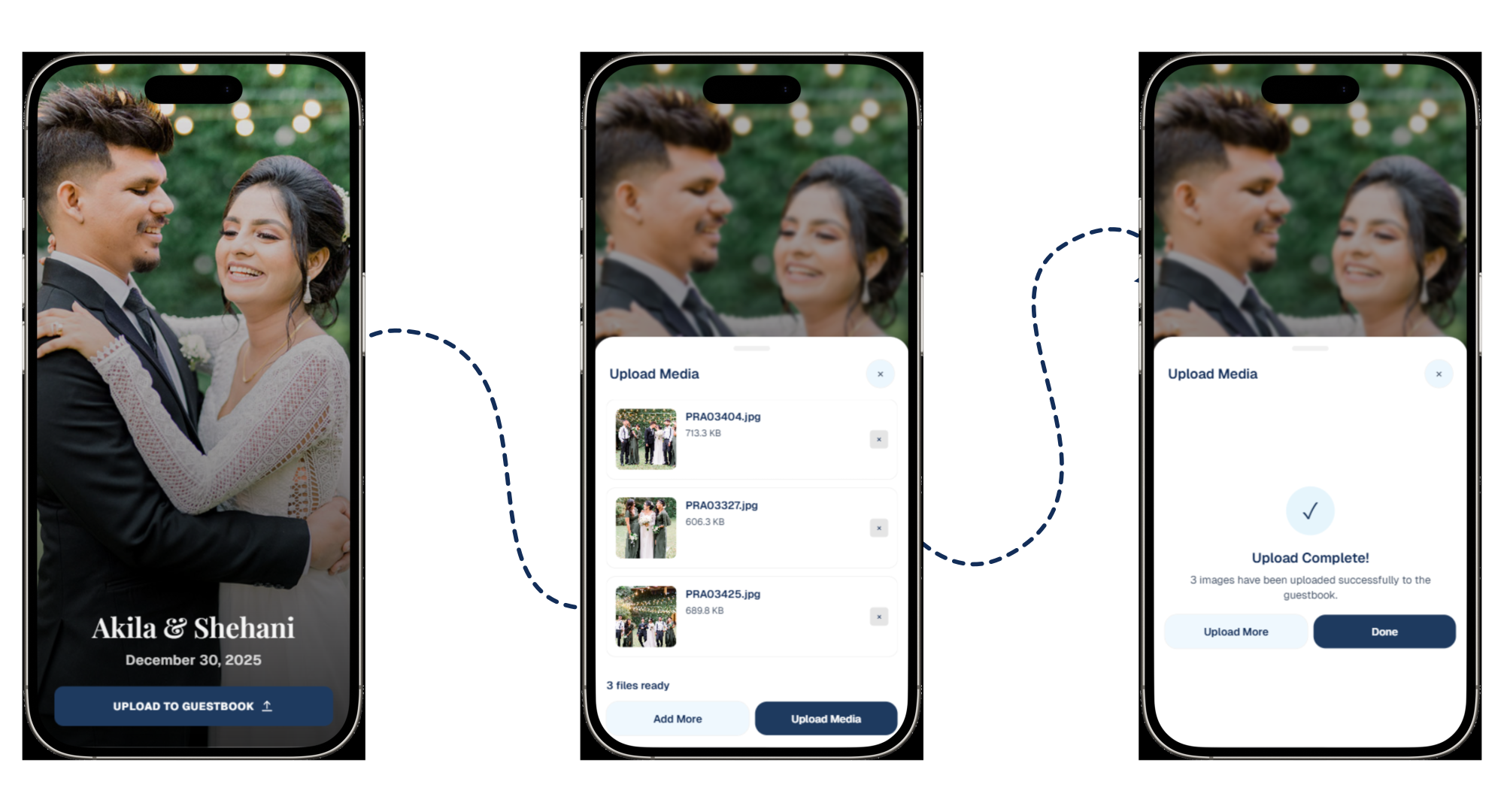
Scan & see event page
Guest scans the QR code with their phone camera. The event page opens instantly—showing the event name, date, and a clear "Upload Media" button. No app download needed!
Select photos to upload
Guest taps "Upload Media" and selects multiple photos from their gallery. They can see all selected photos in the dropzone, ready to upload. No account creation required!
Upload successful!
Photos upload quickly and a success message appears. The photos instantly appear in the gallery below for everyone to see. That's it—simple and fast!
Perfect for any occasion—from grand weddings to casual gatherings
One seamless QR flow for every celebration, milestone, or memorable event in your life.
FAQ
Quick answers guests and hosts usually ask.
Do guests need to download an app?
No—guests scan the QR with their phone camera and upload in the browser.
Can I hide photos I don't want shown?
Yes. As the host, you can hide/unhide photos from your admin gallery.
Can I download everything at once?
Yes—download all visible photos as a single ZIP file whenever you want.
Do guests need internet to upload?
Yes—uploads require venue Wi‑Fi or mobile data.
Advanced Features
Powerful tools for event hosts who want more control.
PIN-protected admin
Secure access to your gallery with a custom PIN code.
Photo approval
Review and approve photos before they appear in the gallery.
Uploader names
Optionally collect guest names with their photo uploads.
Private galleries
Make your gallery private—only you can see the photos.
Customizable templates
Choose from multiple design templates and customize colors.
Live photo wall
Display photos in real-time on a TV or projector during your event.